How to Check Job Application Status Online in South Africa (2026) – Full Guide
You sent your CV. You applied online. And now — silence.
If you are wondering how to check your job application status in South Africa — you are not alone. Thousands of South African job seekers apply for positions every day and then hear absolutely nothing back. No confirmation. No update. No rejection. Just silence.
The good news is that there are clear, professional ways to check on your application status — whether you applied online, by email, or in person. This guide shows you exactly how to do it in 2026 without annoying the employer or damaging your chances.
Why You Often Do Not Hear Back After Applying
Before we get into how to check your status — it helps to understand why employers go quiet.
Here is the reality of job hunting in South Africa:
High volumes – Popular positions receive hundreds or even thousands of applications. HR teams are overwhelmed.
Manual shortlisting – Many companies still review CVs manually, which takes time.
Internal delays – Budget approvals, management sign-offs, and internal processes slow hiring down.
Automated filtering – Some companies use software to filter CVs before a human sees them.
Role changes – Positions are sometimes put on hold or cancelled after advertising.
Communication gaps – Many South African companies simply do not send rejection emails.
None of this means you did not qualify. It means the system is imperfect — and following up professionally is not just acceptable, it is expected.
How Long Should You Wait Before Checking Your Application Status?
Timing matters. Follow up too soon and you look impatient. Wait too long and the position may already be filled.
Here is a general guideline for South Africa:
Online job portal application: 7 – 10 business days
Email application: 5 – 7 business days
Walk-in / hand delivery: 3 – 5 business days
Government / public sector: 4 – 8 weeks after closing date
Recruitment agency submission: 5 – 7 business days
Interview follow-up: 2 – 3 business days after interview
Tip: Always note the closing date on job adverts. For government and formal corporate roles — do not follow up before the closing date has passed. Applications are not reviewed until after the deadline.
Method 1 — Check the Job Portal Directly (Step 2)
If you applied through an online job portal — checking your application status is often as simple as logging into your account. Registering on these portals is the first step.
How to register on job portals:
Go to JoblySA, Indeed, PNet, or Careers24. Click Register or Sign Up. Enter your name, email address, and create a password. Verify your email by clicking the link sent to your inbox. Complete your profile – add your location, job preferences, and upload your CV.
How to check on popular South African job portals:
JoblySA:
Log into your JoblySA account at www.joblysa.co.za
Go to your profile or dashboard
Look for "My Applications" or "Application History"
Your status will show as Submitted, Under Review, Shortlisted, or Unsuccessful
Indeed South Africa:
Log into your Indeed account at za.indeed.com
Click on your profile icon in the top right corner
Select "My Jobs" from the dropdown menu
Click "Applied Jobs" to see all your applications and their status
PNet:
Log into your PNet account at www.pnet.co.za
Click on "My Applications" in your profile dashboard
View the status of each application
Careers24:
Log into your Careers24 account at www.careers24.com
Navigate to "My Applications" in your account menu
Check the status of each submitted application
LinkedIn:
Log into LinkedIn at www.linkedin.com
Click on "Jobs" in the top navigation menu
Select "Applied Jobs" to see all positions you applied for
Tip: Check your job portal accounts at least once every 2 to 3 days. Some platforms send status update emails — but these sometimes land in your spam folder.
Method 2 — Check Your Email (Including Spam)
Many South African employers send automated confirmation emails when they receive your application — and interview invitations or rejection notices when a decision is made.
Step 1: Check Your Inbox
Search your email inbox for the company name or job title. Look for:
Application received confirmation
Interview invitation
Request for additional documents
Regret or rejection notice
Step 2: Check Your Spam or Junk Folder
This is critically important. Many legitimate employer emails end up in spam — especially automated responses from large companies. Check your spam folder daily. Mark any legitimate employer emails as "Not Spam" so future messages arrive in your inbox.
Step 3: Search by Company Name or Keywords
In your Gmail or email app — use the search bar to search for:
The company name
The job title
Words like "application," "interview," "vacancy," or "position"
Step 4: Make Sure Your Email Address Is Correct
If you are receiving nothing — double check that you applied with the correct email address. Log back into the job portal and confirm your email address in your profile settings.
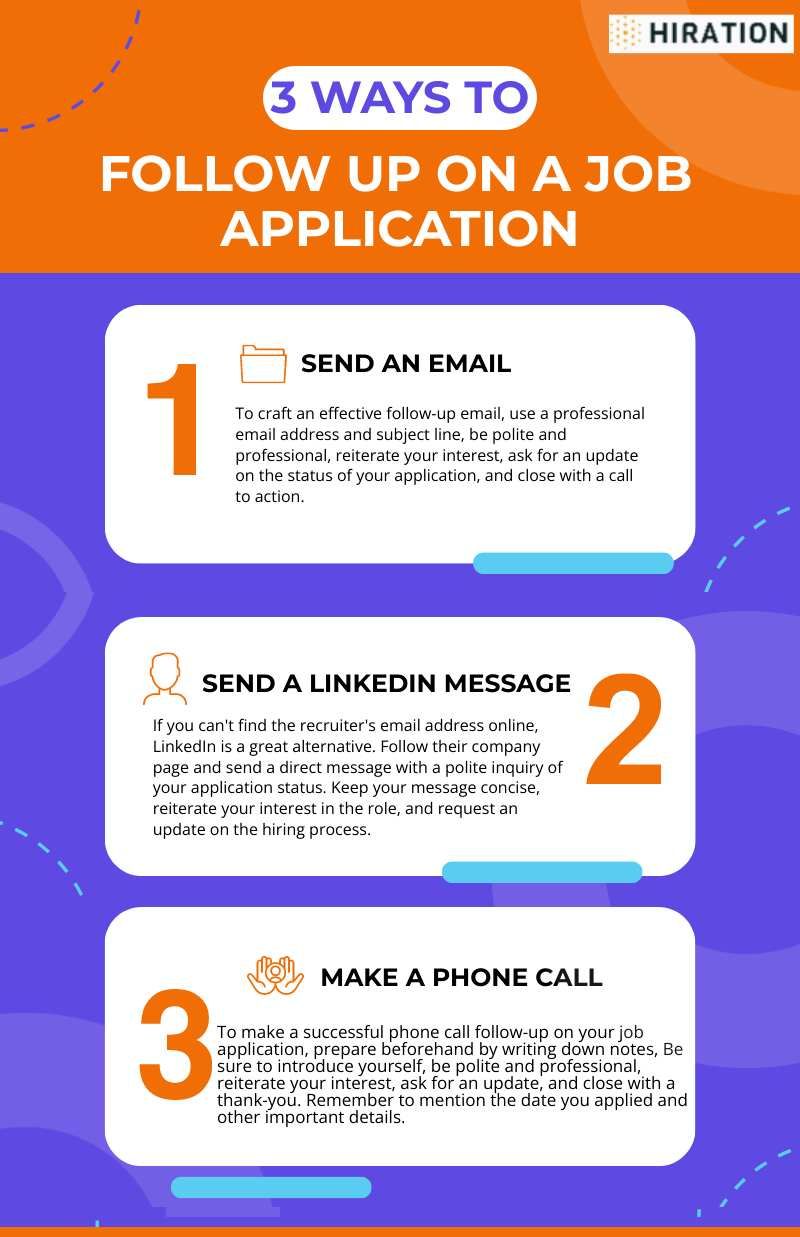
Method 3 — Follow Up by Email
If you have checked your portal and email and still have no update — it is time to follow up directly with the employer.
A polite, professional follow-up email is one of the most effective ways to check your application status — and to remind the employer that you exist among hundreds of applicants.
How to Write a Follow-Up Email
Subject line:
"Follow-Up: Application for [Job Title] – [Your Full Name] – Ref [Reference Number if available]"
Email body:
Good day [Hiring Manager's Name or "HR Team"],
I hope this message finds you well. I am writing to follow up on my application for the [Job Title] position, which I submitted on [Date].
I remain very interested in the opportunity to join [Company Name] and would welcome the chance to discuss my application further. Please let me know if you require any additional information or documentation from my side.
I look forward to hearing from you at your earliest convenience.
Kind regards,
[Your Full Name]
[Your Phone Number]
[Your Email Address]
Tips for your follow-up email:
Keep it short — three to four short paragraphs maximum
Be polite and professional — never sound demanding or frustrated
Include your reference number — if the job advert had one, include it
Attach your CV again — make it easy for them to find your application
Send it in the morning — emails sent between 7am and 9am are more likely to be read
Method 4 — Follow Up by Phone
A phone call is more personal than an email — and in South Africa, many smaller companies and retail businesses prefer phone communication.
When to call:
5 to 7 business days after submitting your application
When you cannot find a company email address
After sending a follow-up email with no response
For walk-in applications where you handed your CV directly to a manager
How to follow up by phone professionally:
Step 1: Find the correct phone number — from the job advert, the company website, or the job portal listing.
Step 2: Call during business hours — between 9am and 4pm on weekdays. Avoid calling on Monday mornings when HR teams are busiest.
Step 3: Introduce yourself clearly and professionally:
"Good day. My name is [Your Name]. I am calling to follow up on a job application I submitted for the [Job Title] position on [Date]. I wanted to confirm my application was received and check if there is any update on the selection process. Could you please direct me to the relevant person?"
Step 4: If transferred — repeat your introduction to the new person and ask the same question.
Step 5: Thank them for their time regardless of the answer.
What to do if they say the position is filled:
Thank them politely and ask: "Are there any other similar positions available currently, or would it be appropriate for me to keep an eye on your careers page for future opportunities?"
This leaves a professional impression and keeps the door open.
Method 5 — Check Government Application Status
If you applied for a government job through the DPSA or a specific department — the process is different from the private sector.
How to check government application status in South Africa:
Step 1: Check the DPSA Website
Visit www.dpsa.gov.za and look for the specific department you applied to. Some departments publish shortlisting and interview schedules on their websites.
Step 2: Contact the Department Directly
Most government job adverts include a contact person's name and number. Call or email them after the closing date has passed to enquire about the status of your application.
Step 3: Be Patient
Government hiring takes significantly longer than the private sector. The typical timeline is:
Closing date to shortlisting: 4 to 8 weeks
Shortlisting to interview: 2 to 4 weeks
Interview to job offer: 2 to 6 weeks
Total process: 2 to 6 months in many cases
Step 4: Check the Standard Message in Government Adverts
Most South African government job adverts include this standard line:
"If you have not been contacted within 3 months of the closing date, please consider your application unsuccessful."
This means if 3 months have passed with no contact — the position was likely filled by another candidate. Keep applying to new vacancies.
Method 6 — Follow Up After an Interview
If you have already attended an interview and are waiting to hear back — this is a slightly different situation.
How to follow up after a job interview:
Wait 2 to 3 business days after your interview before following up.
Then send a short, professional follow-up email:
Subject line:
"Thank You – [Job Title] Interview – [Your Name]"
Email body:
Good day [Interviewer's Name],
Thank you for taking the time to interview me for the [Job Title] position on [Interview Date]. I enjoyed learning more about the role and the team at [Company Name].
I remain very excited about this opportunity and would like to confirm that I am still very interested in the position. Please do not hesitate to contact me if you need any further information.
I look forward to hearing from you.
Kind regards,
[Your Full Name]
[Your Phone Number]
This type of follow-up email does two things — it reminds the interviewer of who you are and it reinforces your interest and professionalism.
What Application Statuses Mean
When checking your application on a job portal, you may see different status labels. Here is what they typically mean:
Submitted / Received: Your application was successfully sent and received
Under Review: A recruiter or HR manager is currently reviewing your application
Shortlisted: You have been selected for further consideration — expect a call or email soon
Interview Scheduled: An interview has been arranged — check your email for details
Assessment Stage: You have been invited for a skills or psychometric test
Reference Check: The employer is contacting your references — a very good sign
Offer Pending: A job offer is being prepared — well done
Unsuccessful: Your application was not successful for this specific role
Position Closed: The vacancy has been filled or cancelled
No Status Shown: The employer has not updated the portal — follow up directly
Tip: "Unsuccessful" for one role does not mean you should stop applying to the same company. Many candidates are hired by a company after being unsuccessful in a previous application. Keep applying.
How to Stay Organised While Waiting for Application Feedback
When you are applying for multiple jobs at once — it is easy to lose track. Staying organised prevents you from following up on the wrong applications or missing important calls.
Create a simple application tracker in a notebook or on Google Sheets:
Company name
Job title
Date applied
How applied (walk-in, online, email)
Contact person / email / phone
Follow-up date
Status (pending, under review, interview, unsuccessful)
Example tracker row:
Company: Shoprite
Job Title: Cashier
Date Applied: 01 May 2026
How Applied: Walk-in
Contact: Store Manager
Follow-Up Date: 06 May 2026
Status: Pending
Review your tracker every morning. Follow up on due dates. Update the status column whenever you receive new information.
Location – Where to Focus Your Follow-Up
Where you applied determines how you should follow up.
Gauteng (Johannesburg, Pretoria, Soweto, Midrand):
Retail and corporate jobs – follow up by email first, then phone
Walk-in applications – return to the store or office in person
Western Cape (Cape Town, Stellenbosch):
Corporate and tourism jobs – email follow-up works best
Smaller companies – phone calls are acceptable
KwaZulu-Natal (Durban, Pietermaritzburg):
Manufacturing and retail – combination of email and phone
Walk-in applications – return in person after 3–5 days
Other provinces (Eastern Cape, Free State, Limpopo, Mpumalanga, North West, Northern Cape):
Smaller towns – phone calls and in-person follow-ups work better than email
Government jobs – be patient (4–8 weeks minimum)
What to Do When Your Application Is Unsuccessful
Getting a rejection is disappointing — but it is a normal part of job searching. Here is how to handle it professionally.
Step 1: Ask for Feedback
Reply politely to the rejection email and ask for feedback:
"Thank you for letting me know. I appreciate the update. Would you be able to share any feedback on my application that could help me improve for future opportunities?"
Many employers will not respond — but some will. Even one piece of feedback can help you improve your next application significantly.
Step 2: Do Not Give Up on the Company
Ask if there are other suitable vacancies:
"I remain very interested in working for [Company Name]. Please keep my CV on file and consider me for any future opportunities that match my profile."
Step 3: Review and Improve Your Application
Ask yourself:
Was my CV tailored to the specific job requirements?
Did I meet the minimum qualifications?
Was my cover letter relevant and professional?
Were my references contactable and prepared?
Make improvements before your next application.
Step 4: Keep Applying
Do not stop applying while waiting for feedback. The South African job market is competitive — always have multiple applications in progress simultaneously.
Tips for Managing Your Job Application Follow-Ups
Set phone reminders – schedule follow-up reminders on your phone calendar
Use one email address for all job applications – makes it easier to track responses
Check spam daily – at least 30% of legitimate employer emails end up in spam
Keep your phone on and charged – many South African employers call without warning
Save employer contact details – save every employer's phone number and email as a contact
Be professional on every call – HR teams talk to each other. Your conduct reflects your professionalism
Keep applying while you wait – never put all your hope on one application
⚠️ Job Application Scam Warning – Stay Safe
While following up on applications — be careful of scammers who exploit job seekers.
Red flags:
🚩 Fake interview invitations – scammers send fake interview emails asking you to pay for transport or uniforms upfront
🚩 Fake rejection emails with "alternative offers" – always verify through official company channels
🚩 Phishing emails – fake employer emails that ask you to click suspicious links
🚩 Fake HR WhatsApp accounts – always verify through the company's official website
🚩 Identity theft – never include your ID number or banking details on your CV
If you suspect a scam — report it to SAPS at your nearest police station.
FAQ: Checking Job Application Status in South AfricaFAQ: Checking Job Application Status in South Africa
Q: How long should I wait before following up on a job application in South Africa?
A: For private sector online applications – wait 7 to 10 business days. For email applications – 5 to 7 days. For government applications – 4 to 8 weeks after closing date.
Q: Is it appropriate to follow up on a job application in South Africa?
A: Yes. Following up professionally shows initiative, genuine interest, and confidence. The key is to follow up at the right time and in the right way — politely and professionally.
Q: What should I do if the employer does not respond to my follow-up?
A: Wait 5 to 7 business days and try again through a different channel. If still no response after a second follow-up, assume the position was filled and redirect your energy to new applications.
Q: Can checking my application status too often hurt my chances?
A: Yes – if done incorrectly. Following up once or twice professionally is fine. Calling or emailing daily will damage your reputation. Always stay calm, polite, and patient.
Q: What does it mean if my application status shows "Under Review" for a long time?
A: It means HR is still processing applications – this is normal, especially for popular positions. Follow up professionally after 10 business days if the status does not change.
Q: Should I follow up if the job advert says "no phone calls please"?
A: Respect the instruction – do not call. Instead, follow up by email only. A professional email follow-up is still appropriate.
Q: How do I follow up on a government job application?
A: Contact the person listed in the job advert after the closing date has passed. Be patient – government hiring takes 2–6 months. If 3 months have passed with no contact, consider your application unsuccessful.
Conclusion – Stay Proactive and Keep Applying
Waiting for feedback on a job application is one of the most frustrating parts of job searching in South Africa. But you are not powerless.
Check your portal accounts regularly. Monitor your email inbox and spam folder daily. Follow up professionally by email and phone at the right time. Stay organised with an application tracker. And never — never — stop applying while you wait.
The South African job market rewards persistence. The candidates who get hired are not always the most qualified — they are the most consistent, the most professional, and the most proactive.
Keep going. Your next job is closer than you think.
👉 Still looking for the right opportunity? Browse the latest jobs hiring now across South Africa on JoblySA — updated daily.
👉 Looking for work near you? Check out jobs in Gauteng and other provinces on JoblySA.
👉 Join our WhatsApp group for daily job alerts — get new vacancies sent directly to your phone every morning.